01
Posts
One composer, three networks
Text, images, a carousel or a reel, previewed at real feed ratios for Facebook, Instagram and LinkedIn. Weekly slots, a month at a glance, and a teammate that drafts the caption from a short brief.
Social
Business owners were composing in one app, resizing in another, pasting into Meta by hand, and finding the comments a week late. Loquent brings the whole loop into one place: compose, schedule, publish, reply, learn — with your AI teammate doing the drafting and you holding the send button.
Facebook · Instagram · LinkedIn · comments and mentions · 90-day insights
This week
posting as youScheduled
2 posts · next Sun 2:06 PM
Needs you
5 comments · 3 drafted
Reach
53.7K · +105%
“Can I book an appointment to see these in person next week?” — reply drafted, waiting for you.
Three tabs, one frame
The three things a social presence needs — putting work out, answering what comes back, and learning what to do next — sit side by side and share one customer record with the rest of Loquent.
Posts
Text, images, a carousel or a reel, previewed at real feed ratios for Facebook, Instagram and LinkedIn. Weekly slots, a month at a glance, and a teammate that drafts the caption from a short brief.
Inbox
Comments and @mentions from both networks with the author, the post, and a drafted reply. Filters that count: needs you, drafted, replied, hidden.
Insights
Reach, engagement, followers and comments answered against the previous window, ranked top posts, and the hours your audience is awake — one tap to add them to your slots.
Posts
Up next, drafts and history in one column; posting slots and the month on the other. Every row shows its networks, its media and its state — scheduled, publishing, published, partly published, failed — and a failed post says why and offers one-tap retry. Posts you made outside Loquent import with their comments, so a newly connected account is never empty.

The composer
Pick the networks, write once, and watch the Facebook card and the Instagram tile fill in as you type. Instagram's rules — hashtags, ratios, carousel limits — are checked while you compose, each with a plain-language fix. Short on words? Give your teammate a brief and take one of its three captions.

Inbox
Each comment shows who wrote it, the post it belongs to, and what kind it is — question, booking, complaint, mention. Your teammate's draft sits underneath with Reply publicly, Edit and Skip. Editing a draft before sending teaches it; a complaint raises an escalation with an apology draft attached instead of being answered on its own.

The autonomy dial
Turn automatic replies on for the comment kinds you trust it with — thank-yous, simple questions — and keep the rest for yourself. It is per organization, confirmed with a read-back, and one tap to take back. Complaints and mentions are never automatic in any setting.
Default
Every comment kind starts here. Read the drafts, shape the voice, build trust.
Automatic, per kind
An explicit, reversible choice for the comments that never needed you — and never for a complaint.
The dial, up close
Each kind of comment has its own switch. The ones you turn on go out on their own about two minutes after the draft lands — long enough to catch one. Everything else waits, and the panel says so in plain words.

Insights
Reach, engagement rate, followers and comments answered, each against the previous 7, 28 or 90 days. Ranked top posts with a comparison bar. The hours your audience is awake, with one tap to add them to your posting slots. And one line from your teammate that reads the numbers for you. A number Meta has not computed says why it is missing instead of showing zero.

Ad results
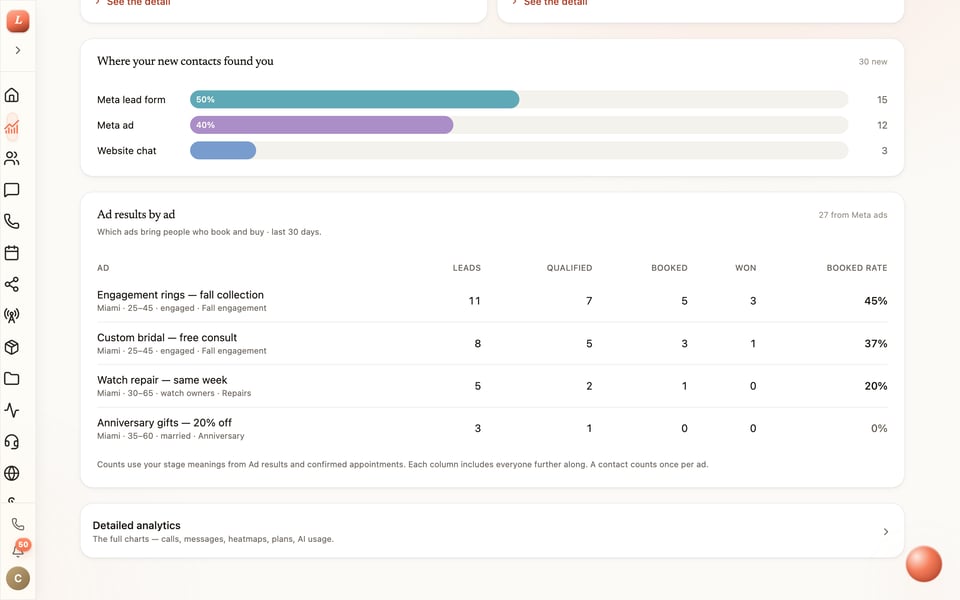
Loquent tells Meta which ad leads reached a stage or booked, from the pipeline it already tracks, so your ads find more people like them. On Insights, every ad that brought someone in shows how many became leads, qualified, booked and won. Turn it on with one switch, prove the connection with one test event, and approve what each of your stage names means.
Keep exploring
Request an invitation and we’ll connect your Facebook Page, Instagram account and LinkedIn Company Page, import your recent posts and comments, and set the posting rhythm that fits your week.
Facebook and Instagram connect through Meta; LinkedIn Company Pages connect directly. Existing posts import with their comments from the last 90 days.
The comment loop
A comment is a customer reaching out.
Treating it any other way is how leads get lost. Loquent treats a comment like a message: it arrives, it gets a drafted answer, you decide, and the person becomes a Contact.
Someone asks under your post.
A question, a booking request, a compliment, a complaint — it lands in the Social Inbox the moment it is posted, with the post it belongs to.
Your teammate writes the reply.
It reads the comment, classifies it, drafts the public reply, and adds a private message when the person asks about a price or a booking.
Send both, public only, edit, or skip.
Nothing leaves without you unless you turn on automatic replies for that kind of comment. Complaints and mentions always wait for a person.
The commenter becomes a customer.
A private reply creates the Contact, and their later messages land on the same thread as everything else you know about them.